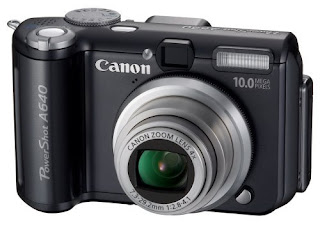
As you might imagine the paradigm shift from traditional film-based photography to digital is rapidly creating new opportunities to learn and grow. The photography industry is moving at an incessant pace, and digital cameras sales have surpassed their film-based cousin at an alarming rate each year. On January 16, 2004, Eastman Kodak announced it would end its sales of film cameras in the United States and on June 15, 2005, Kodak announced it will discontinue production of black-and-white photographic paper by the end of the year as it continues its transition to digital photography. Soon digital cameras will hit critical mass and film will only represent a minute segment of the industry.
What are the main differences?
The differentiator between a traditional 35mm film camera and digital cameras is how the pictures are captured, processed, and stored. A conventional camera exposes an image on a roll of silver-halide coated film. A digital camera captures an image on a photosensitive silicon computer chip called a charged couple device, also known as a CCD. The camera converts the image captured by the chip into digital data and saves it in a camera's memory as a digital photo. These photos can then be copied onto your computer's hard drive where you can email, edit, and save them.
CAMERA SELECTION
Just as with traditional film cameras, digital cameras come in two offerings: point and shoot, and digital single lens reflex (DSLR).
Both types of camera use flash memory cards (“digital film”) to store images and are immediately available for viewing through the camera’s rear liquid crystal display (LCD).
Point and Shoot
Point-and-shoot cameras are extremely affordable and remain the most popular in current market conditions. These cameras are easy to use, give outstanding results, and for all practical purposes are compact. Point-and-shoot cameras mainly offer a limited feature set, offering mostly automatic features such as: auto flash, auto exposure, and the camera selects the shutter speed and aperture for you. Cell phone cameras are low-end point-and-shoot.
Digital Single Lens Reflex (DSLR)
Digital SLR cameras offer photographers the ability to use interchangeable lenses and accessories, which give the photographer greater artistic control and flexibility. DSLR cameras allow photographers to visually check image sharpness and composition. The effects of changing lenses, changing exposure values, and viewing the camera's hisogram are immediately visible in the LCD viewfinder and/or eye viewer. There are many advantages of using DSLR digital cameras. They can handle a variety of lighting and focusing situations unlike point and shoot cameras. DSLR cameras offer optical zoom as opposed to just digital zoom, which essentially crops pixel data and will add unwanted noise to an image.
IMPORTANT TIPS
• Look for cameras that can save files in RAW. Saving your image as a RAW file will provide you with a higher quality image to work from in post processing. Images shot in RAW remain uncompressed, unlike JPEG images. Through repetitive opening/closing of JPEG files image -- image degradation occurs.
• Equally important is finding a camera with a minimal amount of shutter lag. It can be rather frustrating with some of the point and shoot cameras available when there is a long lag between clicking the shutter and the camera taking the shot. Choose a camera with a large buffer memory. This allows a number of images to be continually snapped before stopping to allow them to be downloaded and processed.
• Digital camera quality and the size of the created images are continually rising. As a general rule you will need at least 1800 x 1400 pixels (2.5 mega pixels) to print up to 6 x 4 inch with good quality. To date recommendations include the Canon Rebel XT (8.0 Mega Pixels), Canon EOS 20D, Nikon D70 and so on.
DIGITAL FILM: FLASH MEMORY
Manufacturers of cameras, namely Canon, Olympus, and Sony use memory cards that are usually not compatible with one another. Canon uses compact flash cards and/or IBM micro drives. A micro drive is similar to a compact flash card, but it was formerly recognized for its larger capacity. Olympus uses an xD Picture card and smart media card, and finally there’s Sony. Sony uses a memory stick. File formats generated by flash memory for digital cameras are RAW, TIFF, JPEG. RAW being a memory intensive format uses several megabytes of data on a memory card and does not compress the image at all.
Both RAW and TIFF are known as ‘lossless’ file formats because compression algorithms are absent, thus giving the photographer more pixel data and better image quality. However, since RAW is not as widely recognized as JPEG in the photography marketplace, special conversion software is necessary to convert images from RAW to TIFF or JPG. Some camera manufacturers include RAW conversion software with their higher end point-and-shoot and DSLR cameras, but it is not as great as some RAW applications developed by cutting edge companies such as PhaseOne, a Danish company that markets an outstanding product called Capture One DSLR. It is made specifically for photographers that wish to process RAW files.
One peripheral that will save battery life on your camera is a compact flash card reader. It plugs into your USB port and permits you to download your images by inserting a memory card in it. This is preferred over downloading from your camera/cable because your camera’s battery juice will quickly render your camera's battery dead, especially if you are downloading several hundred photographs. The memory card reader acts as an auxiliary drive. Just make sure you get a memory card reader specifically made for your type of memory card and that it can handle a high capacity card such, i.e. 4GB (Gigabyte) flash card.
At
graffitipix.com, we use mainly a 10-megapixel Canon camera and save in RAW format. That's why our prints look soooo good!
Molly
 If you take pictures, you've heard the term "White Balance". Maybe you saw it in the instruction manual of your digicam, or in a post about photography. But what is it? Simply put, it is how white white is; if you pointed your camera at a truly white object, how accurate would the picture be? This is important if you take pictures of graffiti, which are often shot outdoors and sometimes at night. Amy Renfrey from www.DigitalPhotographySuccess.com


